Top 12 Best No Drill TV Mounts You Can’t Miss Today!
Mounting a TV without drilling holes can seem simple until the mount wobbles or the wall support fails. The best no drill tv mount needs to hold the TV securely without damaging walls or requiring heavy tools, which is a common issue with cheaper models.
A poorly chosen mount may end up scratching paint or slipping, creating more hassle than convenience.
The key factors for a good no drill TV mount include strong materials like steel combined with heavy-duty clamps or tension bars rated for the TV’s weight. Most reliable mounts support TVs ranging from 32 to 65 inches and weights up to 65 pounds. It is also important that the mount fits the VESA pattern on your TV to avoid any setup issues.
A design that leaves space for cables and is easy to clean around adds to daily practicality.
Need a Quick Check?
| Image | Product | Price |
|---|---|---|
Our Top Picks 1  | No Stud TV Mount | Check Price |
Our Top Picks 2  | Perlegear No Drill Mount | Check Price |
Our Top Picks 3  | HangSmart TV Mount | Check Price |
Our Selected Top 12 No Drill Tv Mount for Every Budget
This list features a variety of no drill TV mounts designed for different spaces and budgets. Each product is reviewed for ease of installation, stability, and suitability for various TV sizes, highlighting their strengths and potential drawbacks to help you choose the best option for your needs.
1. No Stud TV Wall Mount
Ideal for renters or anyone avoiding wall damage, this no drill TV mount suits flat-screen TVs between 13 and 55 inches. It stands out by securely holding TVs up to 99 lbs without needing screws or studs, making it great for those looking for a quick and damage-free alternative.
Installation takes just a few minutes using the hardware and clear graphical guide included. The mount fits onto drywall easily and supports VESA patterns from 100x100mm up to 400x400mm, so most TVs between those sizes fit without trouble. Removing or repositioning it requires no special tools, which simplifies everyday use and maintenance.
The mount does its job by holding your TV steadily on drywall without drilling. Build quality appears sound enough for daily use within the weight limits specified. The main praise is the straightforward, damage-free setup.
Some users mention that it’s only suitable up to 99 lbs, so heavier sets won’t work here.
Mounting takes no more than a few minutes thanks to clear instructions and included hardware, and it does not damage drywall. The biggest limitation is the 99 lbs weight capacity, which leaves heavier TVs unsupported by this system.
Those with lightweight TVs and rental spaces appreciate the no-drill convenience and damage avoidance. People with heavy TVs or those planning to mount on different wall types should choose products designed for higher weights or various surfaces.
Pros
- Easy 3-minute installation
- No drilling or stud required
- Fits most 13–55 inch TVs
- Includes all mounting hardware
Cons
- Supports TVs only up to 99 lbs
- Limited to drywall use only
| Specification | Details |
|---|---|
| Screen Size Compatibility | 13 to 55 Inch |
| Weight Capacity | Up to 99 lbs |
| VESA Size | 100x100mm to 400x400mm |
| Installation Time | 3 Minutes |
| Includes Hardware | Yes, all required |
| Brand | Auoace |
2. Perlegear No Drill TV Wall Mount
Perlegear No Drill TV Wall Mount offers a simple, no-drill solution for renters or anyone avoiding messy installations. It fits TVs between 24″ and 65″, holds up to 100 pounds, and secures directly on drywall using nails.
The biggest advantage is its easy setup without the need for studs or heavy tools.
Setting up takes just a hammer and a few minutes, without worrying about stud finders or large holes. The mount’s wall plate uses nails to anchor on drywall, making it renter-friendly and quick to install. Day-to-day, once mounted, it keeps the TV steady and allows for a clean, low-profile look without visible hardware.
It’s straightforward to use with compatible TV sizes and patterns.
Build quality feels solid given the lightweight 0.86 kg design, suitable for TVs with VESA patterns from 100×100 to 400x400mm. Its main function holds well under regular viewing when size and weight limits are followed.
While many appreciate how fast and easy it mounts, a common downside is the restriction to lighter TVs and drywall surfaces only, limiting versatility in some rooms.
Most praise focuses on how simple and fast the installation process is, letting users avoid drilling and stud hunting. The frequent complaint concerns its limit to light TVs and drywall, so it’s not suitable for heavier models or other wall types.
Anyone renting or wanting to avoid damaging walls will appreciate this mount’s design. People with heavier TVs or non-drywall walls will need to explore other options that handle greater weight or different mounting surfaces.
Pros
- Quick installation without drilling
- Supports a wide range of TV sizes
- Lightweight and renter-friendly
- Low-profile design on the wall
Cons
- Limited to drywall mounting only
- Supports TVs up to 100 lbs only
| Specification | Details |
|---|---|
| Brand | Perlegear |
| Model Number | PGMT7 |
| TV Size Compatibility | 24″ to 65″ |
| Maximum Weight | 100 lbs |
| VESA Pattern Range | 100×100 to 400x400mm |
| Item Weight | 0.86 kg |
3. HangSmart TV Wall Mount
No-drill TV mounting feels straightforward and reliable with the HangSmart TV Wall Mount, especially if renting or avoiding wall damage matters. It suits anyone looking to set up a large flat screen quickly without needing to find studs or drill holes.
Its strongest feature lies in letting you hang big TVs without the usual hassle.
Setting it up is a mostly DIY process designed to keep things simple. The patent-pending no-stud system means you rely on a different approach than traditional drywall anchors, making the install less invasive. Day-to-day, it holds the TV solidly, avoiding the need for constant adjustments or worries about the mount slipping.
It fits nearly any flat or curved TV, so you don’t have to check complicated size charts before buying.
Supports TVs up to 100 inches and 150 pounds, built with durability to handle large screens without strain. The mount feels sturdy and capable once installed, providing firm TV support.
The most common compliment mentions its ease of installation without drilling, while critiques focus on the limit for exceptionally heavy or oddly sized units beyond stated specs.
The strongest praise highlights the truly drill-free installation that saves renters from damaging walls and lets you get your TV up quickly. Common complaints mention that very heavy or oversized TVs beyond 150 lbs or 100 inches might push the mount’s limits and require a different solution.
Anyone renting or seeking a non-damaging, easy-to-install option for a large screen will appreciate this choice. Homes needing to mount extremely heavy or unusual TV models should look for mounts designed specifically for higher weight capacities or different installation methods.
Pros
- Installation requires no drilling or studs
- Supports very large TVs up to 100 inches
- Works with nearly any flat or curved screen
- Strongly built for holding heavy weights securely
Cons
- Not suitable for TVs heavier than 150 lbs
- Limited to one-item mount, no extras included
| Specification | Details |
|---|---|
| Brand | Hang Smart TV |
| Model Number | HSTV100 |
| Maximum TV Size | 100 inches |
| Maximum Weight Capacity | 150 lbs |
| Number of Items | 1 |
| Warranty Description | 1 Year |
4. No Stud TV Wall Mount

Perfect for apartment dwellers or renters, this mount fits TVs without damaging drywall. Its biggest strength lies in its no-drill, no-stud design that avoids holes and protects walls while holding a variety of TV sizes securely.
Setting up is straightforward; it doesn’t require any screws or studs, which saves time and keeps your walls intact. It works with most 32-70 inch TVs, fitting VESA patterns up to 400x400mm.
Once mounted, the low-profile design keeps the TV close to the wall and stable thanks to an anti-drop feature, making everyday use reassuring.
Performance is solid, holding TVs firmly on drywall without risk of falling. The build quality feels sturdy and lightweight at just 8 ounces, which adds minimal bulk to the wall. Praise often highlights how it avoids wall damage while complaints mostly focus on its limitation to drywall and certain weight restrictions.
The standout feature is the no-damage installation on drywall, greatly appreciated for protecting apartment walls. A frequent downside is the restriction to certain wall types and potential limits on heavier TV models.
This mount will satisfy renters and anyone looking to avoid permanent wall damage while securely mounting medium-sized TVs. Those with heavier TVs or non-drywall walls should explore other options built for those conditions.
Pros
- No drill or stud requirements
- Compatible with major TV brands
- Anti-drop safety design
- Lightweight and low-profile
Cons
- Only suitable for drywall walls
- Weight limits restrict very heavy TVs
| Specification | Details |
|---|---|
| Fits TV Sizes | 32-70 inches |
| Max VESA Pattern | 400x400mm |
| Mount Type | Drywall, Studless |
| Item Weight | 8 ounces |
| Brand | Aquzee |
5. ECHOGEAR No Stud TV Wall Mount

Built with a clever drywall-friendly design, this TV mount fits perfectly for those who want to avoid drilling into studs. It suits people with lighter TVs up to 77 inches and 100 pounds, offering a solid way to hang a TV without serious wall damage. The main advantage is its no-drill required installation using ultra-strong nails.
Installation takes under 15 minutes thanks to the simple hardware and built-in bubble level for accuracy. You nail it directly into drywall with 32 strong nails, which surprisingly holds the weight well.
Adjusting for glare works with a tilt feature, or you can go flush against the wall using magnetic standoffs, which also helps with cable access and keeps your wall safe.
Performance on drywall is impressively reliable for a mount without stud support, holding TVs safely with no wobbles noted. The mount stays tight and stable, with metal construction strong enough to protect your screen.
Customers appreciate the quick setup and slim profile of just 1.18 inches. The most common gripe involves the limited weight capacity, which doesn’t suit heavier TVs.
Praise centers on the secure hold on drywall without studs and the quick, straightforward installation process. The most frequent complaint notes that the mount can’t support heavier TVs or screens larger than 77 inches, limiting choices for bigger setups.
Anyone needing a lightweight, drill-free mounting solution for a mid-sized TV will find it very suitable. Those with larger or heavier TVs should explore mounts designed for stud installation or different mounting methods to ensure full support.
Pros
- No drilling required
- Easy install with built-in bubble level
- Tilt and flush mounting options
- Slim 1.18″ profile close to wall
Cons
- Max weight limited to 100 lbs
- Only fits TVs up to 77 inches
| Specification | Details |
|---|---|
| Brand | ECHOGEAR |
| Model Number | EGLD1 |
| Mounting Method | No drilling, uses 32 ultra-strong nails |
| TV Size Compatibility | Up to 77″ |
| Max Weight | 100 lbs |
| Depth | 1.18″ |
6. Studless Alloy Steel TV Wall Mount

No drilling or stud finding needed with this TV mount, perfect for renters or anyone avoiding wall damage. It fits TVs from 26 to 55 inches and holds a solid weight, making it handy when you want a clean look without complicated installation.
Setup skips the drill and goes right onto drywall with included hardware and a level to get things straight. It fits snugly on the wall, only sticking out about an inch, which keeps the TV close and tidy.
Tilting the screen slightly up to 5 degrees helps reduce glare without extra hassle. Day to day, it feels solid and keeps the TV secure with the safety cable.
Handles the weight well up to 80 pounds on drywall and even more on wood or concrete. Made from heavy-duty alloy steel, it feels strong and reliable, tested three times for durability. The biggest praise is how easy the no-drill installation is, while a common complaint revolves around the limited tilt range for those who want more angle adjustment.
Ease of installation without drilling is often highlighted as the biggest advantage, allowing quick wall mounting without damage. On the downside, the tilt adjustment is quite limited, which can be frustrating for those needing broader viewing angles.
Ideal for renters and anyone avoiding holes in the wall who has a compatible TV size and weight. Those wanting more tilt or planning to mount very heavy TVs on drywall may want to look for other options.
Pros
- No drill, no stud installation
- Low profile mount, only 1 inch clearance
- Solid alloy steel construction
- Includes security cable and level
Cons
- Limited tilt angle of +5 degrees
- Maximum weight lower on drywall than solid walls
| Specification | Details |
|---|---|
| Suitability | 26 to 55 inch TVs (27,30,32,35,40,42,43,45,48,50,55 inch) |
| Max Weight Capacity | 80 pounds on drywall, 110 pounds on wood/concrete block |
| Material | Heavy-duty alloy steel |
| VESA Compatibility | Max VESA 400x400mm |
| Mount Profile | 1 inch from wall, tilt up to +5 degrees |
| Warranty | 2 Year Manufacturer |
7. No Drill No Stud TV Wall Mount

Choosing a no drill TV mount that protects your walls while holding a heavy TV makes this one worth considering. It suits renters and anyone who wants to avoid wall damage but still needs a secure hold. Its standout feature is the ability to mount without screws or studs on drywall.
Installation requires just a hammer instead of a drill, which takes away most of the usual setup hassle. The compatibility with TVs from 26” to 65” across many brands means you won’t have to worry about fit. The mount sits low profile against the wall, making day-to-day viewing straightforward without bulk or complicated adjustments.
Built to handle up to 154 lbs and tested at three times that, it provides strong security for your TV. The mount is designed for drywall without damaging it, a key benefit for fragile surfaces. A common note is about the need for precise nailing placement during installation to keep the TV stable, which some find tricky at first.
It holds TVs very solidly when nails are placed accurately, offering a no-damage alternative to traditional mounts. The biggest issue is getting those nails exactly right to avoid instability during setup.
People renting or anyone reluctant to drill will find this mount very convenient. Those with walls other than drywall or in need of extra adjustments might want to look for other styles better suited to their needs.
Pros
- Secure hold on drywall without screws
- Fits many TV brands and sizes
- Easy installation with just a hammer
- Low-profile design close to the wall
Cons
- Requires careful nailing for stability
- Limited to drywall, not suitable for other surfaces
| Specification | Details |
|---|---|
| Weight Capacity | 154 lbs (tested at 3x capacity) |
| TV Size Compatibility | 26”-65” |
| VESA Compatibility | 75x75mm-400x400mm |
| Wall Type | Drywall (no damage) |
| Installation | No drill, hammer only |
| Warranty | 10 years |
8. No Stud TV Wall Mount

Mounting a TV without drilling into studs is a challenge in many rental apartments or plaster walls. Great for anyone wanting to avoid power tools, this wall mount handles TVs from 32” up to 75” and holds them firmly using just a hammer for installation.
Its main strength lies in offering a solid, no-drill mounting option that works on drywall or plaster.
Setting up is straightforward, no need to find studs or pull out a drill. The mount comes with all the necessary hardware and uses thick cold-rolled steel for durability.
You just hammer it into place, which makes it renter-friendly and quick to install. Day-to-day, the mount keeps the TV tight against the wall with a low profile that looks neat and doesn’t wobble or shift over time.
It supports up to 150 lbs with confidence thanks to its heavy-duty steel construction. Most users praise how strongly it holds large TVs without drilling, although some mention it can be tricky aligning perfectly since there are no screws to adjust later. The build feels sturdy and reliable, but precision during installation matters for a good fit.
The mount is praised for its strong, stud-less hold using only a hammer, making it easy to install without power tools. Some note the alignment can be difficult since it relies on hammering and there is no screw adjustment after installation. The durability and weight capacity stand out as major benefits.
Anyone in a rental or with drywall wanting a simple, no-drill mounting method will appreciate this. Users with very heavy TVs or non-drywall walls should consider more traditional mounts with stud anchoring for better security and adjustability.
Pros
- No drilling or power tools needed
- Supports a wide TV size range
- Strong hold up to 150 lbs
- Comes with all hardware included
Cons
- Hard to align perfectly during installation
- Only works on drywall or plaster walls
| Specification | Details |
|---|---|
| Compatible TV Sizes | 32 inch to 75 inch |
| Weight Capacity | Up to 150 lbs |
| VESA Compatibility | 200x100mm to 600x400mm |
| Installation | No drilling, just hammer |
| Product Weight | 8.32 ounces |
| Warranty | 5 year |
9. No Stud TV Wall Mount

Capable of holding TVs from 26 to 65 inches and up to 100 pounds, this mount fits a wide range of setups. Perfect for anyone needing a no-drill solution, it relies on steel nails to securely fasten your TV onto drywall without hunting for studs.
Setup is pretty straightforward, making it easy even for those without experience. Just grab a hammer and the included nails, then mount it directly onto drywall. It also works on wood studs and concrete, so you can use it in different rooms without swapping mounts.
Day-to-day use means a stable, fixed TV without the hassle of wall damage or drilling.
Performance in holding the TV steady is solid; the steel nails provide a surprisingly strong grip on drywall and studs alike. Built tough, it feels like a permanent hold once installed. Positive notes mention how easy and fast the install is.
Some worry about the slight limitation in maximum TV weight and size, but this matches most average sets well.
The most praised feature is its simple, drill-free installation that still feels very secure. The most common concern is the weight limit of 100lbs, which may exclude heavier or larger TVs. Everyday use means a reliable, no-damage mounting option for average TVs.
Those seeking a quick wall mount solution without tools will appreciate this design. People needing support for extremely heavy or very small TVs might want to look elsewhere for a compatible mount.
Pros
- Easy install with no drilling required
- Supports various wall types including drywall and concrete
- Secure hold using steel nails
- Fits a wide range of TV sizes and weights
Cons
- Supports up to 100 pounds only
- Not suitable for TVs smaller than 26 inches
| Specification | Details |
|---|---|
| Brand | IWORKBOARD |
| Model Number | XMM501-IW |
| TV Size Compatibility | 26 to 65 inch |
| Max Weight Capacity | 100lbs |
| VESA Patterns | 100x100mm to 400x400mm |
10. Suptek Studless TV Wall Mount

Anyone looking for a no-drill option to mount a TV on drywall will appreciate this mount. It’s perfect for renters or those who want to avoid wall damage.
The biggest advantage is its studless design that lets you attach your TV using just nails and a hammer, making installation straightforward and quick.
Setting it up takes minimal effort since no drill or advanced skills are needed. You simply hammer the wall plate into the drywall with nails provided. The mount holds firmly without needing studs, allowing you to hang your TV in places where a traditional mount won’t work.
Daily use is stable thanks to a pull cord lock that keeps the TV secure on the plate.
The mount holds TVs weighing up to 99 lbs reliably, proving solid during everyday viewing. Built from thick, heavy-duty steel, the wide wall plate helps distribute weight evenly and adds to the durability. A common praise is its strong anti-drop edges and secure locking system.
Some users note it may not work on unusually thin or weak drywall, which can be a limitation.
Strong points include the heavy-duty steel build and anti-drop edges, which keep the TV safely mounted without drilling. The common drawback is the mount’s reliance on drywall strength; thinner or weaker walls may not hold the nails securely enough. This setup provides a stable mount where traditional stud mounting isn’t possible.
Ideal for those renting or anyone wanting to avoid wall holes and tools like drills. People with strong drywall looking for a quick install will be pleased. Those with non-drywall surfaces or fragile walls should consider different mounting solutions that don’t depend on nail-based installation.
Pros
- No drilling required, easy nail installation
- Holds up to 99 lbs securely
- Wide wall plate for strong support
- Pull cord lock adds extra security
Cons
- Not suitable for very thin or weak drywall
- Limited to drywall mounting only
| Specification | Details |
|---|---|
| Brand | suptek |
| Unit Count | 1 Count |
| Number of Items | 1 |
| Weight Capacity | Up to 99 lbs |
| Material | Thick, heavy-duty steel |
11. No Stud TV Wall Mount
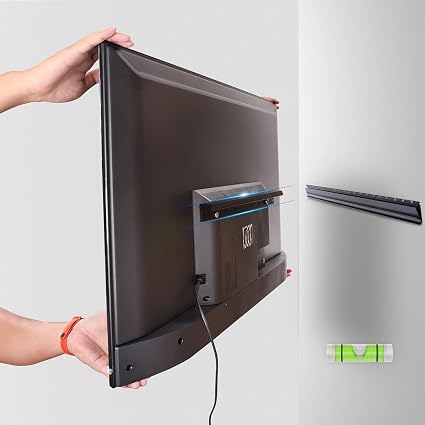
Designed for people who want to mount their TV without drilling, this No Stud TV Wall Mount suits anyone renting or cautious about damaging walls. Its biggest strength is the no-drill installation that uses tiny picture hanging nails rather than screws or anchors, keeping your drywall intact while holding TVs securely.
Setup is straightforward with step-by-step instructions and hardware tailored for various TV brands. The included bubble level really helps install the mount alone in about 10 minutes.
After mounting, the TV remains stable without wobbling, making everyday TV watching easy and stress-free. No anchors or drilling means less mess and no complicated tools.
Constructed from heavy-duty cold-rolled aluminium alloy, it offers solid support up to 100 lbs, providing confidence in its durability. The security cable provides added safety you can rely on. The most praised feature is how sturdy and stable the TV feels, while the common complaint is fitting larger TVs with VESA sizes beyond 400x400mm isn’t possible.
The mount reliably holds TVs with strong construction and easy one-person setup praised by many. Most people note it doesn’t work for larger TV sizes needing a wider VESA pattern. The simple no-drill fix is appreciated, but some wish it fit more massive screens.
Anyone needing a secure, damage-free way to mount small to medium TVs on drywall will find this mount handy. Those with heavier or bigger TVs should look for a model accommodating larger VESA sizes and weights.
Pros
- No drilling or anchors required
- Includes bubble level for easy solo install
- Supports TVs up to 100 lbs
- Security cable included for extra safety
Cons
- Maximum VESA size limited to 400x400mm
- Not suitable for very large or heavy TVs
| Specification | Details |
|---|---|
| Max Load Capacity | 100 lbs |
| Material | Cold-rolled Aluminium Alloy |
| VESA Compatibility | Up to 400x400mm |
| Installation Type | No Drill, Drywall Hanger |
| Brand | Antimbee |
12. monTEK No Stud TV Wall Mount

monTEK No Stud TV Wall Mount offers a solid solution for mounting TVs without drilling into walls. Perfect for renters or anyone avoiding wall damage, it handles large screens up to 100 inches with a heavy-duty design that supports TVs up to 175 lbs on drywall, making installation worry-free.
Setting up the mount is straightforward thanks to its no-drill approach that skips studs, anchors, or traditional drilling. The slide-in design means you can attach, remove, or reposition your TV quickly, which suits bedrooms or apartments where flexibility matters.
Day-to-day use is easy, as the mount stays sturdy without needing constant adjustments or worrying about wall damage.
The mount performs well at holding large TVs securely, tested to support heavy loads on drywall, wood studs, concrete, or brick. Its build quality feels dependable with a lightweight design around 7.36 ounces.
Praise often focuses on its safety and simplicity. Common complaints revolve around limited compatibility with some wall types or very heavy TVs beyond specified limits.
Strong safety features and easy installation stand out, especially as it securely handles heavy TVs without wall damage. Many users note the convenience of repositioning the TV, though some find it won’t work well on certain wall surfaces or with TVs that exceed the weight limit.
This mount suits renters and anyone wanting a sturdy setup without drilling. Choosing this mount makes sense for medium to large TVs under 175 lbs. Those with very heavy displays or unconventional walls should consider other mounting options.
Pros
- Supports TVs up to 175 lbs on drywall
- No drilling, anchors, or studs needed
- Slide-in design for easy mounting and removal
- Compatible with 32–100” TVs
Cons
- Not compatible with all wall types
- Limitations on TVs heavier than specified
| Specification | Details |
|---|---|
| Brand | monTEK |
| Model Number | TM1012W |
| Item Weight | 7.36 ounces |
| Supported TV Size | 32-100” |
| Max Weight (Drywall) | 175 lbs |
| Warranty | 10 Year Warranty |
Best No Drill TV Mounts Side by Side Comparison
| Product | Max VESA Size | Weight Capacity | Warranty | Weight |
|---|---|---|---|---|
| No Stud TV Mount | up to 99 lbs | – | – | – |
| Perlegear No Drill Mount | 400x400mm | – | – | 0.86 kg |
| HangSmart TV Mount | – | – | 1 Year | – |
| No Stud Wall Bracket | 400x400mm | – | 2 Years | 8 ounces |
| ECHOGEAR No Stud Mount | – | – | – | – |
| Studless Alloy Steel Mount | 400x400mm | – | – | 15.2 ounces |
| No Drill No Stud Mount | 400x400mm | – | – | 0.9 kg |
| No Stud Flat Mount | 600x400mm | – | – | 8.32 ounces |
| No Stud Basic Mount | – | – | – | – |
| Suptek Studless Mount | – | – | – | – |
| No Stud Slim Mount | 400x400mm | – | – | – |
| monTEK No Stud Mount | – | – | 10 Year Warranty | 7.36 ounces |
- Max VESA Sizeup to 99 lbs
- Weight Capacity–
- Warranty–
- Weight–
- Max VESA Size400x400mm
- Weight Capacity–
- Warranty–
- Weight0.86 kg
- Max VESA Size–
- Weight Capacity–
- Warranty1 Year
- Weight–
- Max VESA Size400x400mm
- Weight Capacity–
- Warranty2 Years
- Weight8 ounces
- Max VESA Size–
- Weight Capacity–
- Warranty–
- Weight–
- Max VESA Size400x400mm
- Weight Capacity–
- Warranty–
- Weight15.2 ounces
- Max VESA Size400x400mm
- Weight Capacity–
- Warranty–
- Weight0.9 kg
- Max VESA Size600x400mm
- Weight Capacity–
- Warranty–
- Weight8.32 ounces
- Max VESA Size–
- Weight Capacity–
- Warranty–
- Weight–
- Max VESA Size–
- Weight Capacity–
- Warranty–
- Weight–
- Max VESA Size400x400mm
- Weight Capacity–
- Warranty–
- Weight–
- Max VESA Size–
- Weight Capacity–
- Warranty10 Year Warranty
- Weight7.36 ounces
How to Choose the Right No Drill TV Mount
Choosing the right no drill TV mount depends on factors like weight capacity, compatibility with your TV size, and the strength of the mounting mechanism. Getting these right ensures a secure fit, prevents damage to walls and devices, and avoids costly replacements or repairs.
Size and Weight Capacity
TVs come in various sizes and weights, and using a mount that doesn’t fit your model can lead to costly accidents. Installing a mount not designed for your TV’s dimensions or weight often causes sagging or even detachment over time. Mounts typically specify a maximum weight capacity and compatible screen sizes, these numbers matter.
A 55-inch TV usually weighs between 25 and 50 pounds, so the mount should clearly support that range with some margin.
Consider the TV’s thickness and the design of its frame. Slim modern TVs sometimes need mounts with narrower brackets or additional padding to ensure a secure grip.
Checking these details prevents stress on the TV corners or back panel, which might happen if the mount clamps are too tight or misshapen. Matching both weight and size ensures the mount holds firmly without risking damage.
Mounting Surface Compatibility
Not every wall is suited for mounts that don’t require drilling. Drywall can be tricky, especially if the stud placement isn’t suitable or the surface is weak. Brick and plaster walls vary in texture and strength, affecting how securely mounts relying on adhesives or clamps will hold.
The wall’s condition plays a big role. Cracks, moisture, or peeling paint increase the risk of failure.
Surfaces need to be clean, dry, and structurally sound for the mount to stay fixed over time. Sometimes reinforcements like plastic anchors or additional support are necessary even without drilling.
- Drywall with studs nearby is more reliable for clamp-style mounts.
- Textured brick often requires specific adhesive types.
- Plaster walls need careful assessment for weight support.
Installation Mechanism
The mounting process varies between adhesive strips, clamps, and tension rods, each with pros and cons in stability. Strong adhesives can hold a TV without flaws but usually need a perfectly flat, clean surface. Clamps provide grip but might need fine-tuning to avoid slipping.
Tension rods press against opposite walls, which works for corners but depends entirely on wall spacing.
When setting up, look for mounts that don’t require special tools beyond a simple screwdriver or level. Adjustable features for tilt and swivel make daily use easier, letting you change viewing angles without fuss.
Models that offer tool-free leveling systems save a lot of time and frustration when tweaking the position after installation.
Durability and Materials
Mount longevity depends heavily on materials. Steel frameworks tend to outperform plastic parts, especially when bearing significant weight. Some mounts use powder-coated or galvanized steel to resist rust and corrosion, important if moisture might reach the mount.
Reinforced joints and screws help keep the assembly tight and stable over years. Finishes that repel dust and fingerprints require less upkeep and help the mount maintain a clean appearance. White or black powder-coated surfaces often look less worn with normal household cleaning.
Safety and Stability Features
Safety features prevent the TV from falling if the mount loosens. Locking mechanisms, such as safety catches or screws that secure the TV to the mount, are crucial, particularly in homes with children or pets. Without these, even a slight bump could cause detachment.
Stability also means resistance to shocks or sudden movement. Some mounts have been tested for vibration and impact resistance, showing they can hold tight during everyday activities near the TV. Look for mounts that carry third-party safety certifications or have passed industry-standard testing; these give extra assurance that the mount won’t let go unexpectedly.
Tips for Securely Installing No Drill TV Mounts on Different Wall Types
No drill TV mounts rely on strong adhesive pads or tension mechanisms to hold the weight of the television. For drywall, ensure you clean the surface thoroughly to remove dust or grease before applying the adhesive. This will improve the mount’s grip and prevent it from loosening over time.
On tile or glass surfaces, choose mounts with adhesive specifically designed for smooth, non-porous materials. Make sure the wall is dry and free of moisture.
When mounting on wood, the surface should be flat and free of peeling paint or varnish to allow proper contact with the adhesive. Some no drill mounts use pressure or tension against the wall instead of glue, so check that the wall is structurally sound and solid enough to resist the pressure.
The key is to match the mount type to the wall surface and follow the manufacturer’s instructions for cleaning and preparation before installation.
How to Maintain and Clean Your No Drill TV Mount for Long-Term Stability
Regular cleaning of a no drill TV mount helps maintain its adhesive strength and mechanical components. Dust accumulation around the mount can reduce grip or cause strain on joints.
Use a soft cloth slightly dampened with water or a mild cleaner to wipe the mounting surface and brackets. Avoid harsh chemicals that can damage adhesives or metal finishes. Check the mount periodically for any signs of loosening or wear, especially after temperature changes or vibrations.
Tighten any screws or bolts if your mount design includes them. Keeping the mount dry helps prevent rusting of parts made from metal.
Simple maintenance extends the life of your mount and ensures your TV stays securely in place over time.
Common Mistakes to Avoid When Using No Drill TV Mounts and How to Fix Them
A common mistake is overloading the no drill mount by exceeding its weight limit, which risks the mount failing suddenly. Always confirm the TV’s weight against the mount’s rated capacity.
Another issue is improper surface preparation; skipping the cleaning step means adhesives won’t bond well and the mount can slide or fall. Some people install the mount on textured or uneven walls, which reduces contact surface and weakens hold. The easiest fix is to remove the mount and clean the area thoroughly before reapplying.
In cases where the mount feels loose after installation, double-check all fasteners and adjust any tension settings if your model has them. Correct installation and respecting the mount’s limitations will prevent most common problems.
People Also Asked
How Do I Know If a No Drill TV Mount Fits My Wall?
Check the wall type and measure the spacing between studs or use a solid surface like brick or concrete for certain no drill mounts. Make sure the mount’s attachment method matches your wall material to ensure a secure fit.
Are No Drill TV Mounts Safe for Large Flat Screen TVs?
No drill mounts can be safe for large flat screens if the wall structure and mount design support the weight and size. Confirm the mount’s specifications and use additional safety features, such as straps or braces, for added stability.
What Is the Maximum Weight Capacity for No Drill TV Mounts?
Most no drill TV mounts support around 25 to 50 pounds, but the exact limit varies by product and mounting surface. Always read the weight capacity listed and do not exceed it to avoid risk of the TV falling.
How Do I Properly Install a No Drill TV Mount at Home?
Installation usually involves cleaning the mounting surface, aligning the mount carefully, and securing it with adhesive pads, clamps, or brackets following the manufacturer’s instructions. Take time to level the mount correctly for the best viewing angle.
Can No Drill TV Mounts Damage My Walls over Time?
No drill mounts may cause minor marks or wear on some wall surfaces over time, especially if adhesive pads are used. Regularly check the mount’s stability and consider using protective backing to reduce potential damage.
Conclusion
Choose a no drill TV mount that fits your TV’s size and weight for stability and safety. Consider the type of wall surface to make sure the mount will hold securely without damage. Ease of installation matters too, especially if you don’t want to spend a lot of time setting it up or adjusting it later.
Think about how often you plan to move or adjust your TV when picking a mount, and balance that with your budget and available wall space. Take a second look at the comparison table and the options reviewed above to find the one that matches your needs without unnecessary extras.

I’m Ryan Mitchell, an automotive writer with a solid background in vehicle diagnostics and repair. I cover brake problems, transmission issues, dashboard warning lights, battery troubles, and routine servicing. I explain technical problems in plain language so drivers understand what’s going wrong, talk confidently with their mechanic, and make smarter repair decisions.


